which one do u think is the best OS now!

Wednesday, June 8, 2011

ReadyBoost on Linux


In my previous post on readyboost I tried to explain out the basic ideology of the technique called readyboost and also some performance statistics to support the theory. Well that was for Microsoft operating systems [dedicatedly available in Vista or newer and have to be manually configured in older OSs].

 The idea of readyboost is simple. For machines with low RAM, whenever the data access requirements over-flood the RAM, the OS starts to pass the least probably-important data to the page files on the hard disk and loads currently required/most important/high priority data on to the RAM from the hard disk/page files. This is where the machine slows down. Activating the readyboost adds another layer in between the page files and the RAM in the data access hierarchy. Thus whenever the ram over-floods, the new data is loaded from the flash drive and the old data is passed to the flash drive. In the flash drive also data is collected and maintained in the same manner as the RAM.

Now, Linux also uses something similar to the paging file systems called the swap partition. Swap partitions do the almost the same job that is done by the page files in the windows environment. So it is possible to create swap partition on a flash drive. As because flash drives give a higher access speed, the swap partition will be faster on the flash drive. And if we assign priority to the flash drive swap compared to the dedicated hard disk swap, the flash drive enters in to the hierarchy scheme and performs almost the same way as the readyboost concept.

Now the most important thing….. HOW TO DO IT…. [the code is for ubuntu]
Open the terminal.
i>                   Plug-in the flash drive.
ii>                 Linux shall automount the drive. Then you have to unmounts it 
Sudo  unmounts /media/”usbdisk”
iii>                Now find the usb device in the terminal using the command
Sudo df –h    [it will be something like /ev/sda1 or /dev/sdb2 etc. I am considering /dev/sda1 here]
iv>               Sudo mkswap /dev/sda1 [creating the swap at the /dev/sda1 flash drive]
v>                 Sudo swapon –p 32767 /dev/sda1 [-p is to activate a partition and not a file. Anf the number 32767 is the priority number. Linux processes support a priority range of 0-32767. 0 being the min priority and 32767 being the highest]
Ok. The flash drive is now working as a swap partition. It’s better to format the flash drive in exfat file system [specially ext4]  as the swap partition works best on that file system.
To verify the swap partition being operational type the following code on terminal
                Cat /proc/swaps
If the swap partition is active, then it will be shown on the output list along with the dedicated hard drive swap partition(s).
To turn the “ReadyBoost” off on the linux [Ubuntu] type this code on terminal
                Sudo swapoff /dev/sda1 [/dev/sda1 here is the flashdrive as detected in step 3]

Now I did mention that the swap technique will work almost the same way as readyboost. Well, Almost. In windows we were creating a page file which is comparable to a swap file, not a swap partition. Swap files are very flexible but vulnerable. If deleted accidentally, data could be lost or even the OS can get corrupted. Swap partitions can’t be modulated while being used. Thus the data cannot be affected. And in some cases the access speed in swap files is better than swap partitions. In linux, we are creating a swap partition on the flash drive. We shouldn’t create a swap file as because linux will not prevent us from deleting the file due to its high flexibility. So the speed advancement in linux may not be as promising as in windows. But, yeah it still works..

Sunday, April 3, 2011

Multi core architecture Simplified


I have come across many people who just can’t figure out exactly how is the multicore architecture better than the single core. A more important question among them is, how is a single core 2.55GHz single core [e.g. pentium 4] processor is not better than a 1.6GHz Dual-core, Core2Duo etc. processors.

Well it’s certainly a very strong point that, the clock frequency ultimately decides the processor speed. Higher the clock frequency, better the processor performance. But still we moved to the multicore architecture even if the clock frequency is not necessarily greater.  WHY?

The reason is simple.

The higher the frequency, the faster the processor.

The faster the processor, greater the data speed.

The greater the data speed, more the heat generated.

As the generation of fabrication technology advances, the transistors become smaller the current processors are built over 32nm (µ=32nm >Sandy bridge &  λ=32nm > in R&D) fabrication technology. The smaller the transistor get, the less power is required and the less heat they can sustain.

So, we can’t just keep increasing the clock frequency. As the generation of fabrication advances, the transistor density increases in the processor. The processors become smarter and more capable. But the supported clock frequency may not increase relatively.

So far, it is clear that processor clock frequency can’t just be increased to achieve higher efficiency. Now, comes the multicore architecture. The most common idea about multicore processors is that, they consist of multiple processors cores in the same board, thus gives twice the performance than single core. Well it’s not entirely wrong.  Lets take a Dual Core processor for understanding. In a Dual Core processor, there are 2 cores embedded on the single core environment. The cores share the same BUS system. Thus if one core performs at its 100% the other can at max achieve 80% of its processing capability (as per the processor architecture).


This is an example shown here.  In the environment, there are 2 cores each of 3.6GHz core speed, sharing  the same bus system.  The BUS structure is optimized to a level to achieve 80% of max performance while the other core delivers 100%.

If we increase the number of cores, the effective performance  will be relatively lesser than an architecture with lesser number of cores, though the overall performance increases.


 Another example?? 


 Consider a system with 4 cores. A Core 2 Duo processor. In this type of architecture 2 dual core processors are scaled together to give a 4 core based processor system. The dual cores a are designed in the fashion described earlier. Here dual core fabrication is just a part of the process. The dual cores achieved 80% SOSS, resulting in an 180% processing power compared to a single core. The 2 cores are embedded together in a single processor  architecture. Here the SOSS remains 80%  but the COCS is 70% for both the dual cores.  If the number of cores are increased under the same architecture, with each layer of scalability the efficiency will get relatively reduced. Standard Core2 Quad systems were built in an architecture similar to Core 2 Duo, but the Xeon Quad cores are designed in a more efficient way.

So this was the general architecture of multicore environment processors. Though one must be aware that, multi core is not all that makes the new generation processors so much efficient.

I will post, in the upcoming weeks, about the latest Core i series processors, 2nd generation intel processors and various technologies that help increase performance dramatically, e.g.  HTT, AVE, DFT, ITB etc.
Thank you for reading.

Thursday, December 30, 2010

Instant Boot

At the beginning when I used to get so amazed to see that “Loading Windows” screen [1st  was introduced to windows later other OSs ].  After an year or 2, I used to get amazed to realize that the behind that boring screen so many drivers were being loaded, so many things are happening behind the screen. And finally the OS logon screen appeared. WOW.
And now, I feel like throwing my PC if takes to much time to boot. “60 second to boot!! I rather keep in on”. :P
Many people does keep their PCs on, as because the boot time is too much for them. Power isn’t cheap. IF every one can save 1Watt/month, that could serve someone or few with no power at all.
Apart from the Nobel thoughts, keeping the PC ON, reduces the device lifetime and there are other side effects also. So the Idea of Instant boot was in the dreams for a long time.
And voila, Microsoft hints for an 8 second boot Windows 8. With Intel’s SandyBridge processors, It may be possible to provide boot time less that 8sec.  Microsoft didn’t promise anything but they are working on the feature called “Instant ON”.

While this stays on the drawing board, there are a few products in the cloud that could give people a taste of the “POOFFF!!! __ON”  action. A popular tool called SplashTop/QuickWeb, which can be installed parallel to the standard OS in a PC and it will integrate with the BIOS and will allow a 4 sec boot to that app. SplashTop/QuickWeb app. has the facility of Browsing, Listening to music ,viewing Photo Gallery, check emails Etc. Now this is a very promising tool. Its very useful to access the Websites and listen to music without waiting for the boot time. IF we want to get in to the main OS, there is a button on the app to boot into the OS.

Yeaah.. that’s awesome.. But that doesn’t comply to the challenge of instant booing to the Main OS with full features…
ASRock came up with some thing called “Instant BOOT”. This brand new technology allows to boot supported motherboards within a blink to the fully functional OS. It not only saves energy but helps system running speed.
The function is effective iff u hav a single user account with no password to their system. The boot time will depend on the H/W config.

At the beginning when I used to get so amazed to see that “Loading Windows” screen [1st  was introduced to windows later other OSs ].  After an year or 2, I used to get amazed to realize that the behind that boring screen so many drivers were being loaded, so many things are happening behind the screen. And finally the OS logon screen appeared. WOW.
And now, I feel like throwing my PC if takes to much time to boot. “60 second to boot!! I rather keep in on”. :P
Many people does keep their PCs on, as because the boot time is too much for them. Power isn’t cheap. IF every one can save 1Watt/month, that could serve someone or few with no power at all.
Apart from the Nobel thoughts, keeping the PC ON, reduces the device lifetime and there are other side effects also. So the Idea of Instant boot was in the dreams for a long time.
And voila, Microsoft hints for an 8 second boot Windows 8. With Intel’s SandyBridge processors, It may be possible to provide boot time less that 8sec.  Microsoft didn’t promise anything but they are working on the feature called “Instant ON”.

While this stays on the drawing board, there are a few products in the cloud that could give people a taste of the “POOFFF!!! __ON”  action. A popular tool called SplashTop/QuickWeb, which can be installed parallel to the standard OS in a PC and it will integrate with the BIOS and will allow a 4 sec boot to that app. SplashTop/QuickWeb app. has the facility of Browsing, Listening to music ,viewing Photo Gallery, check emails Etc. Now this is a very promising tool. Its very useful to access the Websites and listen to music without waiting for the boot time. IF we want to get in to the main OS, there is a button on the app to boot into the OS.

Yeaah.. that’s awesome.. But that doesn’t comply to the challenge of instant booing to the Main OS with full features…
ASRock came up with some thing called “Instant BOOT”. This brand new technology allows to boot supported motherboards within a blink to the fully functional OS. It not only saves energy but helps system running speed.
The function is effective iff u hav a single user account with no password to their system. The boot time will depend on the H/W config.
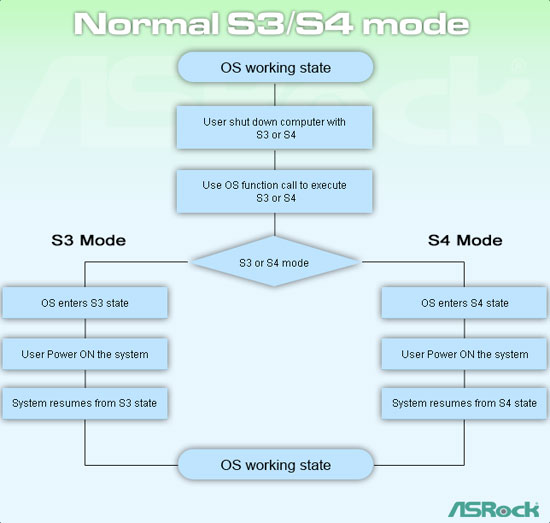
The following block diagrams taken from the ASRock site, explain the process:


The System Power States:


The states S1,S2,S3,S4 are3 the sleeping states where the system cant perform any computational task. While the S5 state is the complete shutdown state. A sleeping state allows to retain memory state of the system eighter in hardware or in some other storage media.
Devices may be able to wake up on occurrence of certain incidents.  e.g. call to the modem, alarm on the mobile phone etc. with the increase of the sleep state index the System goes into deeper sleep starting from shutdown of processor clocks(S1) to loss of total system hardware contex(S4).
During the Hibernate method the memory is written to a Hibernate file. During hibernate, all sort of power consumption is off. The operating system context is retained in a hibernate file.  Before restart, the system loads the hibernate file and reads for the jump location and returns to the previous state called the prehibernation location. If AC power is lost, the system cant wake up from S1,S2,S3 states and requires to boot up to S0 state. But S4 state retains the memory due to the hibernate file.


Power consumption
Software resumption
Hardware latency
System Hardware Context
S1
Less than S0.
Processor clock off
BUS clock off
Control Starts Where It Left Off
Typically not more than 2 seconds
All Contexts Retained & Maintained by H/W
S2
Less than S1
Processor off
BUS clocks off
BUS might have power
At wake-up control starts from processor’s reset-vector
2 sec of more
CPU context & System cache context lost
S3
Less than S2
Processor off
Some chips may be off
At wake-up control starts from processor’s reset-vector
Almost same as S2
CPU, Cache, Chipset context lost
System memory retained
S4
Off, except the trickle current to the power button
System reboots from the Hibernate file
Undefined and considerably  long
Nothing retained. System loads from the hibernate file

So there u have it.. if your mother board is Instant boot enabled go for it. Or if you hav a new ASRock/ASUS motherboard, download the Instant boot tool from the ASUS website.
Otherwise.. hang out with the QuickWeb or SplashTop..
Thank you for reading.
Plz give comments on the article.


Sunday, October 17, 2010

A 5G-ed Claytronic Cognitive Future


This is a huge picture of the future, so I am gonna be steady with What I wanna say.
First let us get two technology understood.
What is Claytronics?
è Well it’s a branch of nanotech science where devices are conceptualized to be build of millions of nanobots called catoms. The idea is to create and mass produce a type of nanobotic entity which can be programmed to construct a synthetic reality of any existing construct irrespective of the entity being an organism or an object.
For any conceptual/theoretical details on claytronics you can check the Carnegie Mellon University website.
So claytronics offers us an intelligent robo-form which is tiny like a grain and it can communicate with others of its kind and mimic live, objects or organisms in real 3D space.
A simple example [that first came on to my mind], I can sleep at home while my robo-form attend my classes. J
 What is 5G?
è Simple, 3G, then 4G and voila … 5G. 5G is the breed of future network which offers enough cognizance to make devices self aware and intercommunicative. A simple example, my digi-cam/mobile would know the location of the view, the camera is focusing to and wont let me take pictures if camera is not allowed there. Every picture I take, will be uploaded to my cloud storage immediately. Its just a fragment of the masterpiece called the FUTURE.

Why discuss it now!!
è Both of the above technologies are directly linked to AI[artificial Intelligence] and are going to be dominant at the same time.  But the possibility.. more like eventuality of the implementation of 5G in claytronics is kind of unnoticed. There one most impressive display of claytronics and 5G in the movie TRANSFORMERS revenge of the fallen. There is a scene when a decepticon robot[dog] lands on earth and pours a huge number of catoms through a air pipe. And these catoms reach the secured chamber where the CUBE shard was kept. They combine to construct a suitable form to steal the shard.  The reason for discussing now is that, India is ready for it now, this October. And all thanks to Rajnikant. His movie ROBOT though was pretty much inspired from iROBOT and the Bysentinal Man, it had its own spark. There was a scene when huge number of Rajni-bots   combine togather to form a larger robo-sepience and some other construct. Both of the movies are Hit. So the people did digest it easily. It’s the right time to discuss about this.


I did mention that catoms are programmable didn’t I!
Catoms require a new type of programming beyond normal OOP. The revival of TSR with modifications comes into play. The programming environment here, is highly organized, single purposed, densely concentrated and physically a dynamic network of unwired nodes. The clatronic-matrix not only have to be able to transfer packet data through unstable channels but also have to actuate the physical locations of the anonymous nodes while transferring data.
Claytronics is a brainchild of prof. Seth Goldstein[associate professor at Carnegie Mellon] and Todd Mowry[Director at INTEL Research Pittsburge].
With the help of INTEL researchers at Carnegie Mellon developed 2 programming languages for catom matrix programming.  While MELD takes a gobal logical perspective  to ensure higher  proximity to overall performance while LDP[locally distributed predicates] concentrates on distributed pattern matching.
Still both of the languages are underdeveloped and improving contneously.
To improve insight to the subject INTEL is providing an open-source UNIX based simulator [DPRsim] where codes can be tested [supports even C]. Details about Dynamic physical rendering can be found on the Intel website.

OK. Now we have catom. We know that they can be programmed. We have 5G and catoms use network, effectively internet to communicate.
Now, the big picture. After a certain success in claytronics, the template codes for synthesizing reality [e.g. a human simulation, a car, a phone] will be stored on a cloud storage. Catoms will be able to access the codes and download the required ones accordingly. So the catoms are togather  semi-cognitive and they are interacting over a cognitive network.
An outcome scenario>My personal catoms are my pet bots. They keep tack of me. They asses my need and behavioral patterns, store the generated model on cloud, predict my next move. They form a mobile when I need a phone. They might even form my car and drive me to office. They form my couch when I want to rest. There is just no limit to this “to do” list.  

The future may be uncertain to us but not the other way around.  Hell of an imagination… right!!!